Download
Windows only
It does not run on macOS or on phones. On a Mac you can use it through a virtual machine such as Parallels, or on a Windows cloud PC. Google Chrome is also required.
Grab the app below, then log in with the same account you use here.
Hiddenpick.zipv1.0.91
The download is a .zip. Right-click it → Extract All and a Hiddenpick folder appears. Open it and run Hiddenpick.exe. Leave the other files in that folder as they are: the exe does not run on its own.
Google Chrome must be installed for the app to work. Get Chrome
The download is open to everyone. Running it needs an account with an active plan.
Sign upSetup
1Keep the extracted folder together anywhere you like and run Hiddenpick.exe inside it. There is no installer.
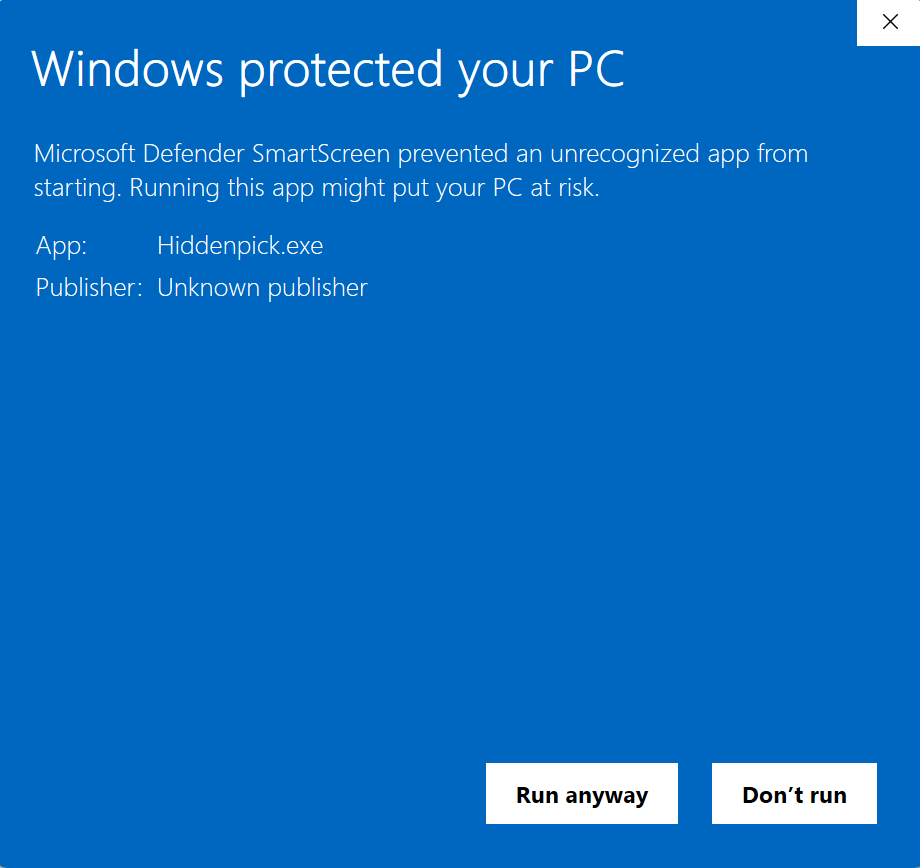
2If Windows shows a "protected your PC" warning, click [More info] → [Run anyway]. Windows shows this for any app without a distribution signature.
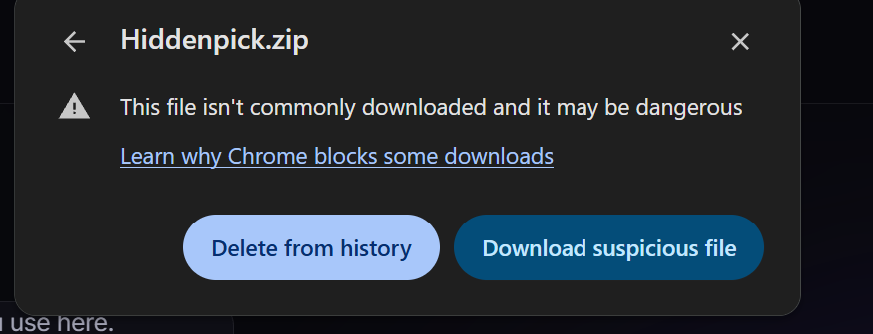
3If antivirus blocks it (Chrome "virus detected", or the zip won't extract), it's a false positive. Unsigned apps are sometimes misflagged. (1) If Chrome blocks the download, open the downloads list, click the file, then the right-hand button [Download suspicious file]. (2) If it vanishes while extracting, go to Windows Security → Virus & threat protection → Protection history, [Allow] the item, then extract again. You can also scan it on VirusTotal to be sure.
4Log in inside the app and your saved settings follow you.
5Updating? Close the program first, then overwrite it with the new file. Overwriting while it runs causes a Security validation failure error. If you already saw it, close every copy of the program and run it again.