Coinone API compared with Upbit and Bithumb, rate limits, signing, IP rules, order types and fees from the official docs
2026-10-28
40 per second. That is how many order requests the Coinone API accepts for one portfolio. In the same slot, Upbit lists 12 and Bithumb lists 140.
On numbers alone Bithumb looks generous, but the three exchanges do not even count on the same basis. Before reading reviews of a Coinone trading bot, it helps to put the API rules that bot depends on side by side, straight from the official docs of the three exchanges. Every number here was checked in the docs on October 26, 2026.
1.What a Coinone bot actually calls
A Coinone trading bot usually calls the Coinone Open API. It splits into a Public API for market data and a Private API for balances and orders.
One overview page that ranks high in search lists Coinone's limits as about 90 public and 60 private calls per minute. That is more than ten times off from the official numbers below.
Any limit quoted in a bot's description is worth checking once against the official docs.
2.Three exchanges compared: limits, signing, IP, orders, fees
Request limits
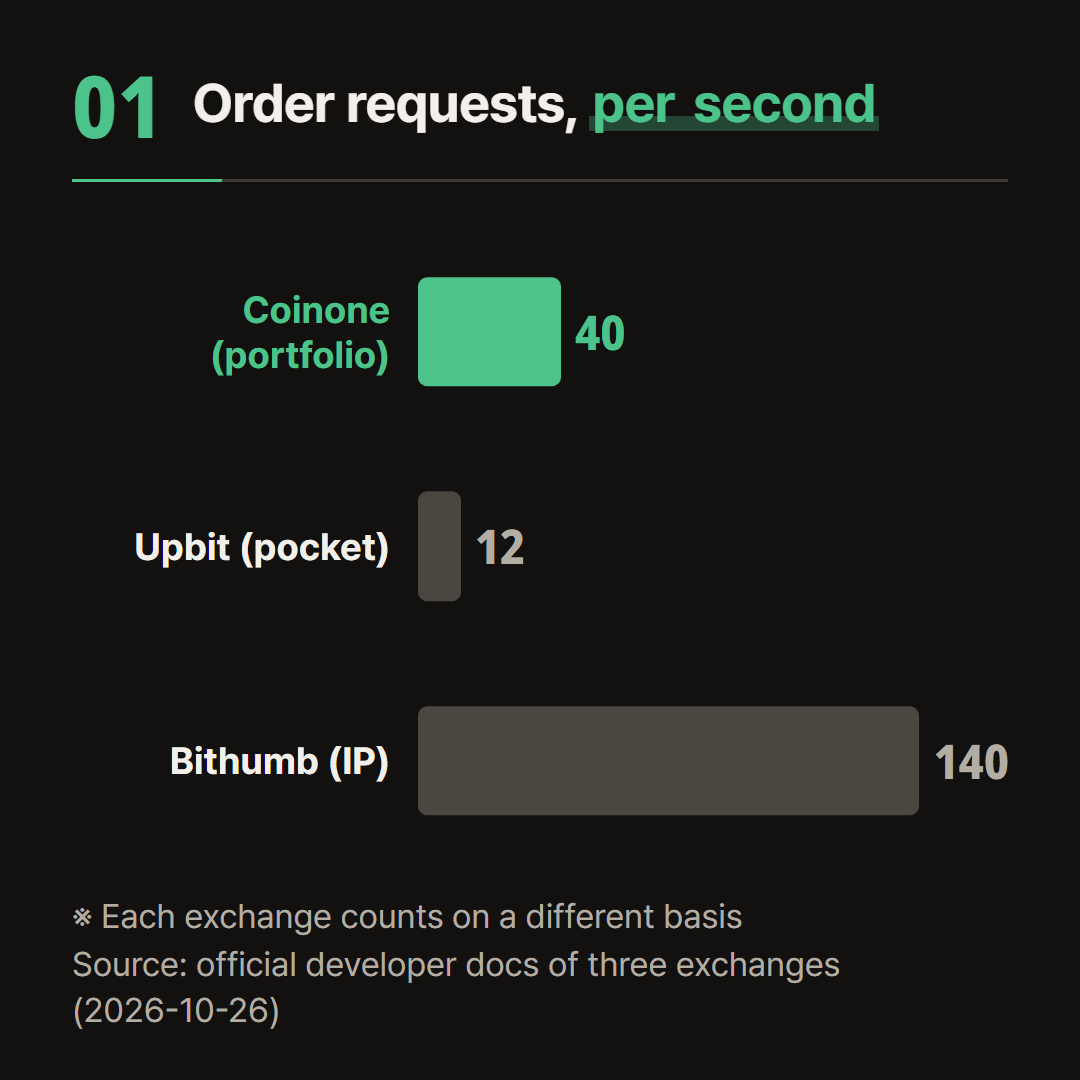
Portfolio: the unit managed under Assets > Portfolio on the Coinone site. Private API limits are counted per portfolio.
Coinone Private API V2.1 allows 40 requests per second for order APIs and 80 for everything else. Public API V2 allows 1,200 requests per minute per IP (Coinone rate limits).
Upbit allows 12 new orders per second and 30 for the default group such as balance and order lookups, counted per pocket. Market data is 10 per second per group per IP (Upbit rate limits).
Bithumb allows 140 per second for each private category (orders, cancels, everything else) and 150 per second for each public category (Bithumb rate limits).
Bithumb counts per IP, so running several keys from one PC still leaves a single limit.
Over the limit, Coinone returns error_code 4 with Blocked user access. Upbit sends 429, and repeated 429s lead to a short 418 block. Bithumb temporarily restricts that API category for the IP.
Signing and IP
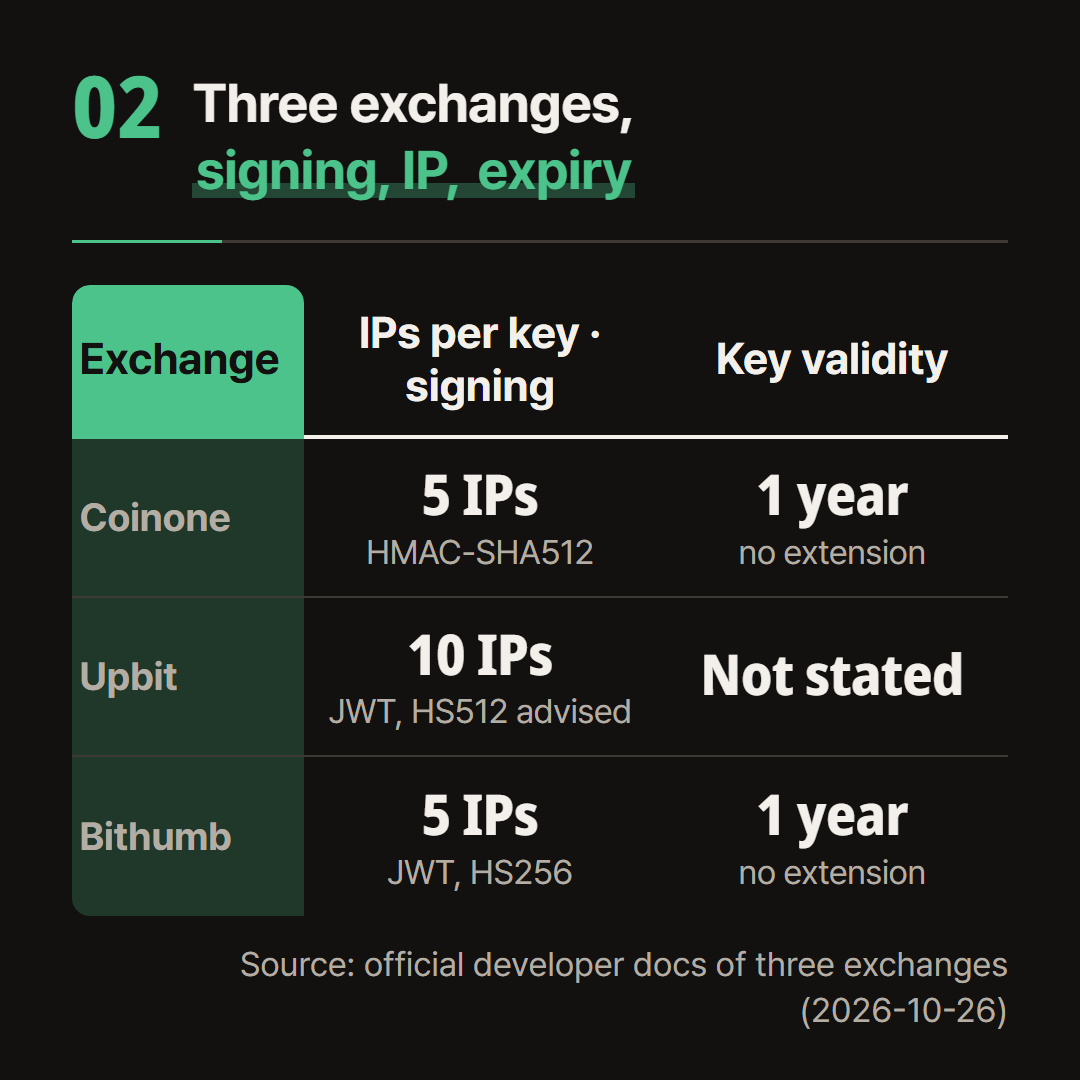
Coinone puts access_token and nonce into the request body, encodes it in Base64 and sends it in the X-COINONE-PAYLOAD header. The same value is signed with the Secret Key using HMAC-SHA512 and sent in X-COINONE-SIGNATURE (Coinone request guide).
In V2.1 the nonce is a fresh UUID for every request. Upbit and Bithumb build a JWT and send it as a Bearer token in the Authorization header. Upbit recommends HS512, and the Bithumb docs sign with HS256 (Bithumb auth token).
Coinone and Bithumb allow 5 IPs per key, Upbit allows 10 (Upbit authorization). All three only accept calls from registered IPs, and Coinone and Upbit take public IPv4 addresses only.
Coinone and Bithumb keys are valid for 1 year from issue and cannot be extended. An expired key has to be deleted and issued again (Bithumb API key list). The Upbit docs give no validity period.
On Coinone and Bithumb, a new key has to go into the bot once a year.
Order types
The Coinone order API offers limit (LIMIT), market (MARKET) and stop limit (STOP_LIMIT), and post_only can be added to limit orders (Coinone order API).
A limit_price on a market order works as a ceiling for buys and a floor for sells. Nothing fills past that price, and the unfilled remainder is cancelled automatically.
Upbit and Bithumb offer limit, market buy, market sell and best price, with IOC, FOK and post_only conditions. Bithumb accepts those conditions only in KRW markets.
Only Upbit has a separate order test endpoint (8 per second). The Coinone and Bithumb order docs have no test order API.
Fees
Coinone applies 0% Maker and 0% Taker to orders placed with a personal API key from August 21, 2026 00:00 until further notice. Outside that period the base rate is 0.02% for both Maker and Taker (Coinone API trading fees).
Linked outside services, caution or delisting pairs and AI grid trading do not get the 0% rate.
Linking a Coinone key to a service someone else runs means the base rate applies instead of 0%.
The Upbit and Bithumb developer docs state no fixed fee rate. Both return bid_fee and ask_fee per account through their order chance API, so the thing to check is whether the bot reads those values.
3.The IP grace period that ended August 5, and the one-year expiry
When Coinone changed its security policy, older keys got a 90-day grace period to register IPs, ending August 5, 2026 at 15:00 KST. Keys without an IP by then were restricted at once, whatever their validity (Coinone security policy).
For keys issued before the policy, the year counts from the policy date. For keys issued after it, the year counts from the issue date.

The Coinone docs warn that a dynamic IP can get calls blocked and advise a static IP. If the bot runs on the seller's server, the IP to register is that server's address.
4.Checklist before putting a key into a Coinone bot
Before entering a Coinone key
- Limits: asked whether the bot slows itself to stay under 40 order and 80 other requests per second per portfolio
- Errors: confirmed the bot pauses and retries after error_code 4
- IP: the public IPv4 of the machine running the bot is among the 5 registered addresses
- Expiry: the key's issue date and its expiry one year later are written down
- Fees: it is clear whether orders go out on a personal key or through a linked service that pays the base rate
Hiddenpick is a Windows program that keeps on its server the betting rules that pick owners do not make public, and runs them as they are on the PC of the person who received them through a referral code. It currently runs on Evolution live baccarat at Stake (stake.com). It needs no exchange API key and works from the Chrome window on the user's own PC, and how it starts and stops is in the baccarat bot guide.
We are recruiting national pickster representatives, and those selected receive benefits worth $12,000, a one-year pass. Apply: https://hiddenpick.my/pickster
- 25,000+ real shoes collected and analysed since September 2026
- 90+ baccarat tables from the lobby on one screen · refreshed every 0.35s · seated 2 to 4 seconds after a click
- Stops by itself at your take-profit and stop-loss · tie several PCs into one team and stop on the total
- No browser extension · your money stays in your own Stake account · 12 languages